
mJob Newsletter
Strategic updates and insights for the mJob Community
March 2026✉️ Hello mJob Community
A message from John Storms, Product Manager
As we march toward the end of the first quarter, our focus at mJob remains squarely on helping you drive efficiency in the field. This month, we are excited to introduce enhancements that give you more flexibility with your data and workflows.
In this edition, we’re highlighting a much-requested upgrade to our import templates, diving into the best ways to handle standard and project manager reviews, and extending our special promotion for another month to help your team scale. Thank you for being a part of our journey as we build a better way to work.
— John
mJob Module Month
By popular demand, we are extending this offer! For the month of March, existing customers can receive 30% off any and all mJob modules (other than labor).
Already own a module? No problem — you can still get the discount on additional modules you add during March.
Offer valid for existing customers during March. Discount applies to eligible modules only (labor excluded).
System Updates & Security Reminder
New: Enhanced Import Templates
Previously in mJob, the import template screen allowed for up to 10 fields to be mapped into the import template. We are excited to announce a new modification that enhances the import configuration screen to support a variable number of field mappings.
- The maximum number of mappings will now correspond to the total number of fields available in the associated database table.
- If the number of mappings exceeds the visible area of the screen, a vertical scroll bar will automatically appear to accommodate additional mappings without compromising usability.
Reminder: Important Security Update
As part of our ongoing security review process, we identified an area in the mJob WebApp (versions 15.7.2 and earlier) that could benefit from enhanced protection. This has been fully addressed in our latest release.
- mJob Version: 15.7.3
- WebApp Version: 15.7.3.32
Please confirm that you are running these updated versions. If you are on an earlier version, our Support Team is ready to assist with a quick upgrade or patch to help maintain a safe, reliable environment.
Contact Support: support@mjobtime.com
🚀 mJob Power Features: Unlock Full Potential
Are you utilizing the full power of your mJob system? This month, we’re highlighting features designed to automate workflows and provide deeper insights into your operations.
Time Automation Rules
Eliminate manual calculations. Automate complex payroll logic, including overtime rules, shift differentials, and mandated breaks based on your custom requirements.
Construction Analytics
Turn raw data into actionable insights. Leverage powerful dashboards and reporting to monitor labor costs, track productivity, and keep jobs under budget in real-time.
🏆 mJob Best Practices
The difference between Standard Review and PM Review.
Standard Review vs. Project Manager Review
Depending on your role, mJob offers distinct screens to ensure time records are processed, distributed, and approved accurately. Here is how to know which one fits your task.
🔍 Standard Review
The standard Review screen is your go-to hub for daily oversight. It allows users to view, edit, delete, and approve records (Labor, Equipment, Logs, etc.) based on user permissions.
- Filters: Easily filter by current date, job, foreman, or employee. Sort any column with a click.
- Edit & Distribute: Make quick job/cost code corrections, or use "Distribute After Entry" to allocate a single chunk of unapproved time across multiple tasks seamlessly.
- Field Approvals: Supports 1-click foreman approval, employee PIN, and signature approvals. Approved records lock (turn green) and can only be modified by a higher approval level.
- Custom Views: Utilize the Hide/Show menu to tailor your grid, or toggle Paging and Card View in settings for a smoother experience.
💼 Project Manager (PM) Review
Designed specifically for PMs, this screen allows for high-level weekly oversight of jobs to approve, reject, or modify distributions.
- Weekly Focus: Select a week-ending date and drill down into specific jobs and days to review all records created by your foremen.
- Redistribute Time: PMs can add distribution columns (phases, cost codes, pay codes) to reallocate hours. Rule of thumb: The "Unallocated" column must always equal 0 before saving to ensure total hours remain unchanged.
- Per Diem Management: Quickly apply per diem allowances to individual employees or replicate across the entire crew.
- Approve or Reject: Bulk approve records or send them back. If a record is rejected, mJob requires a reason and will automatically email the foreman who created it so corrections can be made.
🛠️ Tips & Tricks
Setup Event Notifications
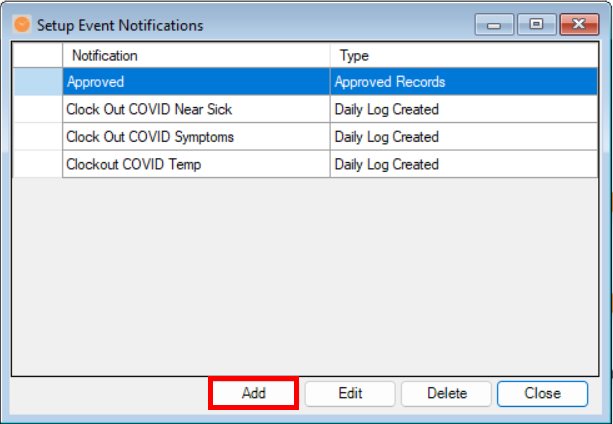
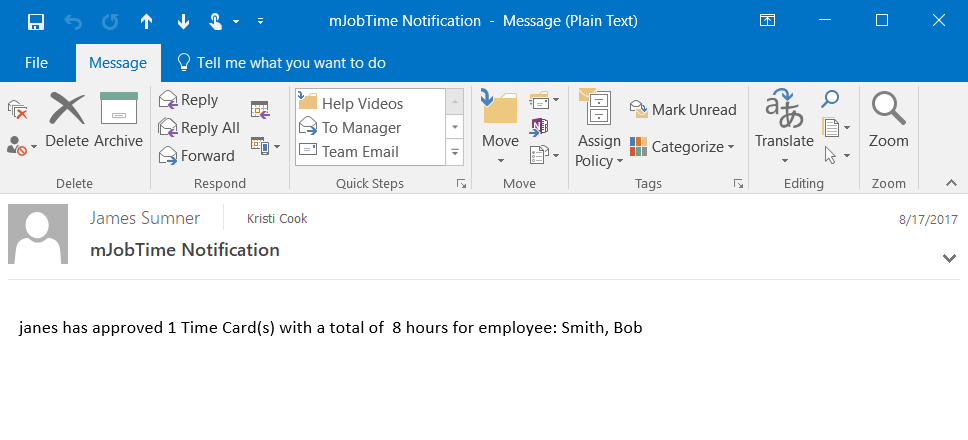
Keep your team in the loop automatically! mJob Event Notifications send an email alert when specific actions occur—like a geofence violation, an exceeded budget, or when daily logs are created.
Quick Steps
Note: Email must be configured in Company Settings to use this feature.
- Go to Utilities > Setup Event Notifications and click the Add button.
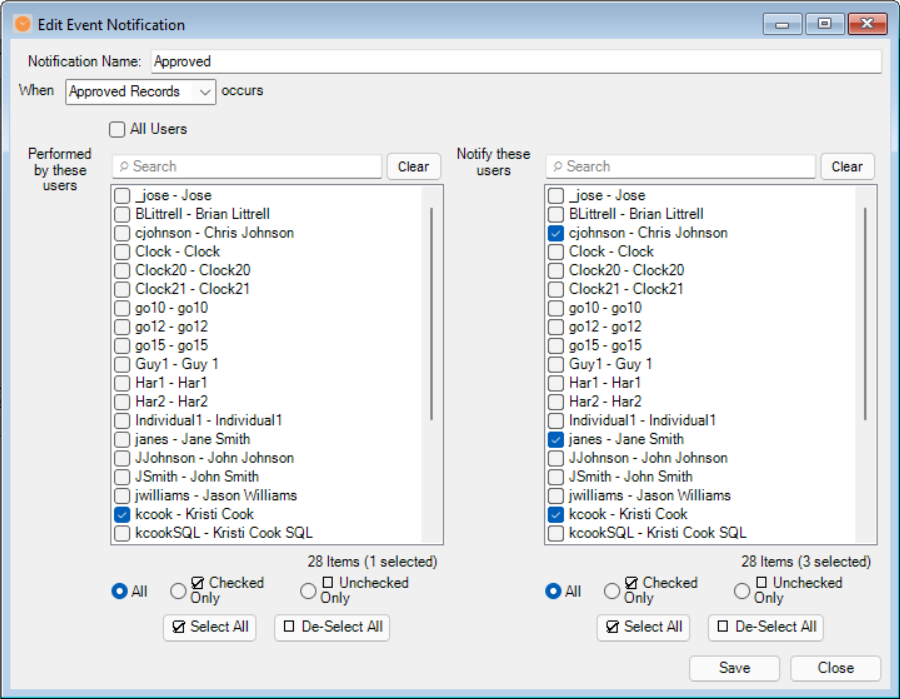
- Name your notification and choose the notification type from the drop-down menu.
- Select the user(s) whose actions will trigger the alert on the left (or check All Users).
- Check the box next to the user(s) on the right who will receive the email, then click Save.
📄 Latest Blog

Geofencing vs. Reality in Construction
Geofencing looks great on paper—drawing a digital perimeter around a job site ensures employees only clock in when they are actually there. But what happens when construction realities clash with technological limitations?
In this post
- How remote sites, poor cell reception, and changing boundaries affect GPS limits.
- Strategies for balancing accurate time capture with real-world job site constraints.
- Configuring mJob tracking settings that fit your crews.
🏢 Company News

Executive Announcement
Welcome Wayne Newitts!
We are excited to announce the addition of Wayne Newitts as Chief Operating Officer here at mJob. Wayne has worked as a partner with us for years during his days with Sage and Viewpoint and brings decades of construction software experience to the team.
In his new role as COO, Wayne will be instrumental in adding more value and new offerings to the mJob portfolio of applications. In his spare time (and, he claims, “for fun”) he researches, reports, and speaks on trends in construction technology.
Recent Publication
Prepare for Impact – AI & the Future of Construction ManagementFeatured in CFMA's Building Profits
Feel free to reach out to Wayne anytime at
wayne.newitts@mjobtime.com