
The Premier Construction Time Clock App for Field Crews
Empower your foremen. Protect your payroll.
Stop chasing paper timesheets. mJob's construction time clock app provides unparalleled flexibility for field employee time tracking. Whether your foremen need to enter time for a single individual, a group of employees, or an entire predefined crew, our platform adapts to your jobsite realities.
From rapid grid entries to advanced approval workflows: the #1 app for contractors needing versatile jobsite time tracking.

6 Ways to Capture Field Time
Every jobsite operates differently. mJob gives your foremen the flexibility to choose the exact entry method that fits their crew's workflow without slowing down production.

Real-Time Punch
Instant, to-the-minute clock in/out for individuals or entire crews as work happens.

Daily Manual Entry
Rapid "After-the-Fact" entry to log shift hours and cost codes at the end of the day.

Weekly Timesheets
Streamline data entry by submitting a full week of hours, phases, and jobs at once.

Barcode Scanning
Scan badges via camera or Bluetooth scanner for high-speed batch clock-ins.

Photo Verification
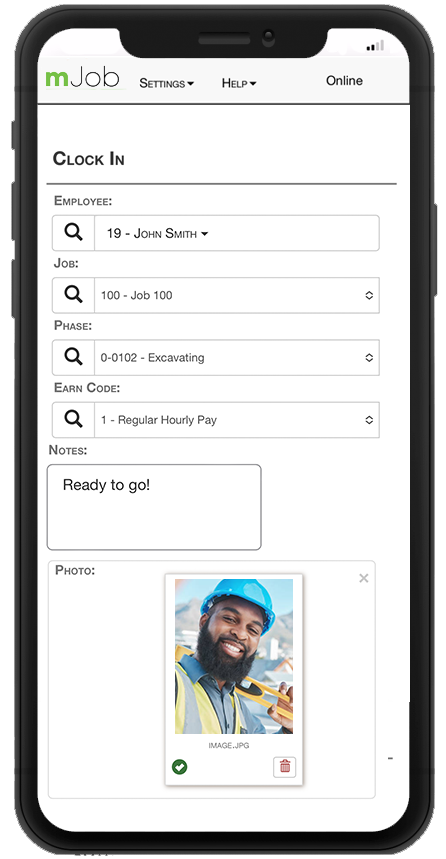
Require a photo at clock-in/out to verify identity and eliminate buddy punching.

Timeclocks & Biometrics
Eliminate buddy punching with rugged fingerprint scanners and touchless palm readers.
View Hardware →
Flexible Crew Time Tracking
Supervisors need tools that match the pace of construction. mJob offers Daily and Weekly entry modes, allowing you to log time for an individual, multiple selected employees, or an entire crew simultaneously.
Advanced Data Capture
- ✓Detailed Logs: Enter exact clock in/out times or capture down to the minute with Advanced Time Entry.
- ✓Custom Fields: Track specific equipment, item codes, comp codes, and custom UDFs directly from the field.
- ✓Auto-Shifts: Automatically set employee shift times based on their assigned record.
Grid & Multi-Entry for Complex Jobsites
When workers switch tasks constantly, single-entry forms slow you down. The Multi Entry and Grid Entry screens allow you to enter time on multiple jobs, phases, and cost codes for a crew, one day at a time, in a rapid grid-style format.
⚡ Use the "Replicate Top Row" or "Replicate Down" button to instantly copy information across multiple records.
High-Speed Barcode & Photo Verification
Empower your foremen with field employee time tracking methods that eliminate bottlenecks at the start and end of shifts while ensuring accurate identity verification.
Barcode Scanning
Use the device camera or an external Bluetooth scanner for Continuous or Batch scanning. Allow multiple employees to be clocked in/out sequentially using default job assignments, or apply the exact same cost code data to an entire scanned batch instantly.
Photo Verification
Enable the "Take Picture" feature to require the device camera to capture a photo of the employee during clock in or clock out. These photos are attached directly to the time record for easy management review.

Powerful Field & Office Tools
Effective field workforce management requires tools that work the way you do—anywhere, anytime, and in the language your crews speak.
PM Review Screen
A dedicated dashboard for Project Managers to approve, reject, or modify labor, equipment, and per diem records before they hit payroll.
- ✓Filter by job, foreman, or employee
- ✓Add distribution columns instantly
Field Approvals & Distribution
Easily redistribute unapproved hours across different cost codes after entry. Allow foremen and employees to approve time directly.
- ✓One-click foreman approval
- ✓PIN & digital signature verification
Offline Mode & Spanish Support
Don't let a bad signal stop payroll. Work offline and sync automatically when a connection is restored. The entire mobile interface is also available in Spanish for broader crew adoption.
- ✓Store data locally in dead zones
- ✓Toggle instantly between English & Spanish
Field Workforce Management FAQs
Common questions about deploying our construction time clock app to your crews.
What is a construction time clock app?
A construction time clock app is a tool designed for field crews to log labor hours directly from the jobsite. mJob features multiple entry methods including daily manual entry, weekly grids, and multi-entry screens.
How does crew time tracking work?
Supervisors can select a predefined crew to clock in simultaneously. Using features like Grid Entry, foremen can rapidly process entire teams at once and replicate data across multiple records.
Can project managers review jobsite time tracking data?
Yes. mJob includes a dedicated PM Review screen where Project Managers can approve, reject, or redistribute labor hours, equipment time, and per diem records before they hit payroll.