
Biometric Time Clock for Construction Companies
Eliminate buddy punching, stop time theft, and ensure accurate time on every jobsite.
Time theft costs the industry billions. mJobTime’s advanced biometric time clock for construction puts an end to unverified hours. Whether you need rugged fingerprint scanners for a dirty jobsite or touchless palm readers for the office, we ensure every labor hour is 100% verified. Our workforce management tools seamlessly integrate with your payroll software to lower labor costs and prevent ghost employees.
From manual timesheets to forensic precision: join construction companies who rely on mJobTime for total payroll accuracy.
Why Use Biometric Time Tracking?
Stop chasing manual signatures. Biometric time tracking in the field ensures that your forensic-grade time data is accurate before it ever hits payroll. In the high-turnover world of construction, knowing exactly who is on the clock is critical for safety and profitability.
The End of Buddy Punching
"Buddy punching"—where one worker clocks in for another—distorts your job costing and inflates labor hours. A biometric scan creates an undeniable audit trail, ensuring that the employee time you pay for is the time actually worked.
- ✓Zero Time Theft: Eliminate shared PINs or lost badges.
- ✓Real-Time Sync: Data flows from the field to the office instantly.
- ✓Offline Mode: Capture scans in dead zones; data syncs when signal returns.
Identity Assurance
Ghost Employees
Audit-Ready Labor
See the field biometric scanner in action.
Rugged Hardware for Every Environment
From the harsh conditions of a jobsite to the hygiene requirements of the office, our package of biometric solutions covers every need.
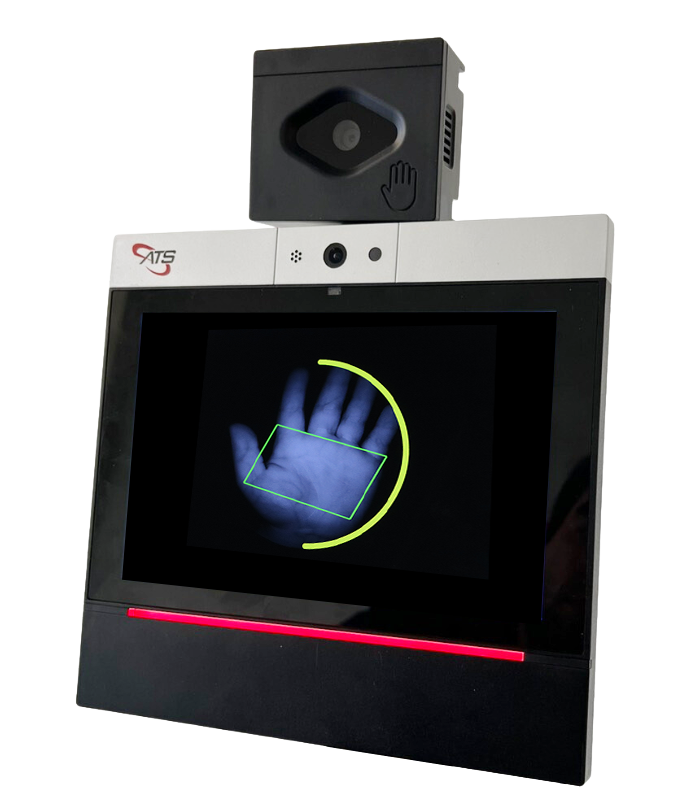
Stride 80™
The ultimate in hygiene. Features a touchless palm vein reader and an 8-inch color touchscreen running on Android.
Touchless
ATS Maximus™
Our award-winning flagship terminal. Ethernet, WiFi, and rugged biometric scanning to stop time theft instantly.
Rugged
The Prodigy™
The perfect blend of performance and affordability. Ideal for essential workforce management with biometric security.
Affordable
Severe Duty
Built for the elements. NEMA 4X water-tight enclosure designed to survive rain, grime, and extreme heat.
WeatherproofBluetooth Biometric Scanners for iOS
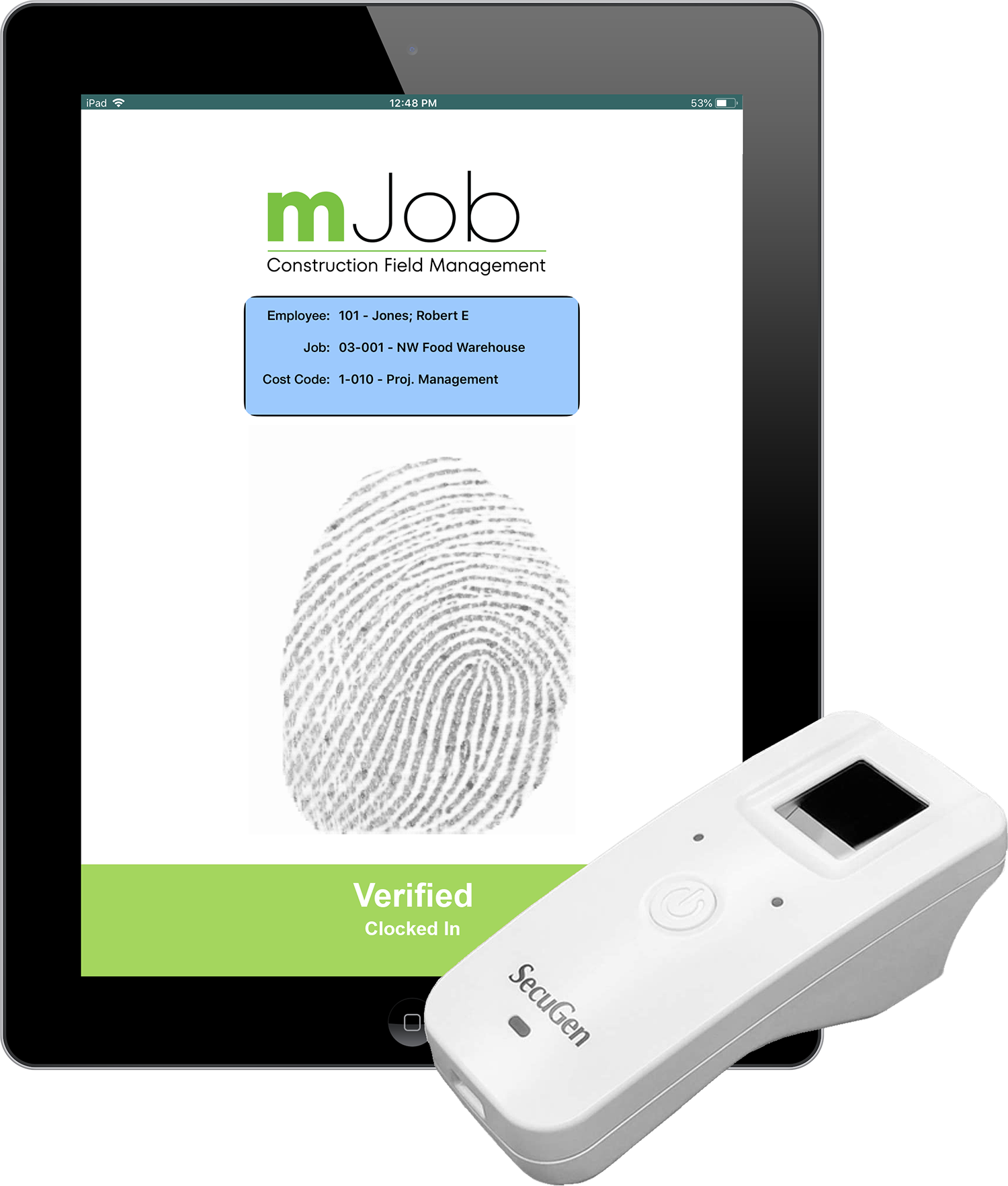
Pair the SecuGen Unity 20 with our dedicated mobile app to transform any iPad into a forensic biometric time tracking terminal. This portable biometric time clock is designed specifically for mobile construction crews.
It's the perfect solution for supervisors who need to clock in an entire crew quickly without sacrificing security. The scanner creates a secure connection, verifies the fingerprint, and logs the time against the correct project code.
Mobile Features
- ✓Custom Questions: Enforce safety protocols or health checks at clock-in.
- ✓Spanish Language: Toggle the interface instantly for diverse workers.
- ✓Portable Power: Long battery life for all-day field use.
Total Workforce Management Tools
mJobTime isn't just a clock; it's a complete system to manage scheduling, tracking, and reporting. Reduce customer service tickets with your payroll provider by sending clean data every time.

Secure ID
Biometric data ensures the right person is at the right jobsite.

Payroll Sync
Direct integration with Sage, Viewpoint, and Acumatica.

Labor Hours
Accurate tracking of hours reduces overtime disputes.

Real-Time
Supervisors see who is clocked in instantly via the dashboard.
Biometric vs. Manual Timesheets
Using paper or simple PIN codes leaves you vulnerable to theft. A construction time system based on biometrics provides the security that manual timesheets and standard construction software cannot match.
| Manual Timesheets / PIN Codes | mJobTime Biometric Time Tracking |
|---|---|
| Prone to "Buddy Punching" and shared passwords. | 100% verified identity via fingerprint or palm vein. |
| Data entry errors lead to payroll delays. | Payroll accuracy is guaranteed with automated sync. |
| Ghost employees can be added to the payroll easily. | Physical presence is required to create a time record. |
| High administrative overhead for verification. | Reduces payroll processing time significantly. |
| No way to prove who actually did the work. | Forensic audit trail for every labor hour. |
Frequently Asked Questions
Common questions about implementing biometric time clocks for construction.
What is biometric time tracking?
Biometric time tracking utilizes unique physiological markers—such as fingerprints or palm veins—to verify an employee's identity. This process is essential for field labor tracking in construction because it prevents time theft and eliminates the possibility of one employee clocking in for another.
Are portable biometric time clocks durable enough for job sites?
Absolutely. Our rugged time clocks, such as the Maximus Severe Duty, are built with NEMA 4X watertight enclosures. These portable biometric time clocks are designed to withstand extreme temperatures, dust, rain, and the daily wear-and-tear of a jobsite.
How does touchless biometric tracking work?
Touchless solutions like the Stride 80™ use near-infrared light to map the unique vein patterns in an employee's palm. This form of biometric time tracking is 100% contact-free, making it the most hygienic and secure option for high-traffic shop environments and office workers.
Does mJobTime sync with my accounting software?
Yes. All data captured by our biometric time tracking hardware syncs seamlessly with major ERPs including Sage, Viewpoint, and Acumatica. This ensures that your verified field data flows directly into your payroll and job costing modules without manual entry, improving payroll accuracy.
Part of mJob's construction labor management software suite.