

mJob Newsletter - September 2026 Issue
mJob Logo
Issue #9 September 2026
Reece Jordan

Welcome to the September Newsletter!

September is here, and there is plenty happening at mJob. This month, we are highlighting the powerful new capabilities in Release 15.8.1, taking a look at the latest construction industry trends, and getting ready to meet customers and industry leaders at Groundbreak 2026 in Orlando.

Reece Jordan

Communications Director

Product News

Release 15.8.1 Delivers Powerful Automation, Integration, and Workflow Enhancements

Release 15.8.1 introduces significant improvements across both the Desktop and WebApp platforms, focused on streamlining data processing, strengthening integrations, and enhancing workforce management workflows.

Desktop Enhancements

Users can now take advantage of scheduled Auto Export processing for QuickBooks and Sage 100, expanded GPS and mapping capabilities, and a completely new Ad Hoc Import Grid with configurable mappings, validation, and advanced import options. Release 15.8.1 also expands integration support with Procore, Sage 100, and Stride80, while adding desktop-based signature capture, enhanced payroll costing features, and improved user management flexibility.

WebApp Enhancements

The WebApp receives major workflow improvements, including new approval PIN validation, revision tracking, and approval-after-clockout processing. A new Custom Timesheet and Distribution workflow provides greater flexibility for labor, equipment, and material tracking, while enhanced daily distribution, review screens, and document processing improve efficiency and usability. JWT authentication, device validation, and expanded offline capabilities also strengthen security and mobile workforce productivity.

Across both platforms, Release 15.8.1 continues to improve operational efficiency with enhanced signature processing, reporting controls, integration capabilities, and workflow automation designed to support field and office teams alike.

Economic Update September 2026

US Construction Industry Outlook

The latest data heading into September points to a construction market that remains active, but increasingly uneven as contractors balance softer overall spending with continued hiring and elevated input costs.

Spending Trends

U.S. construction spending was running at a seasonally adjusted annual rate of $2.17 trillion in June, down 3.2% from a year earlier. Private nonresidential spending edged up 0.1% from May, while public construction remained essentially flat.

Labor Market

Construction added approximately 22,000 jobs in July, even as total U.S. payroll employment softened. Construction employment also increased year-over-year in 36 states and Washington, D.C., showing continued demand for skilled labor across much of the country.

Material Costs

Input costs remain a key pressure point. Prices for inputs to new nonresidential construction were 7.1% higher than a year earlier in June, with aluminum, copper, steel, and other tariff-sensitive materials contributing to continued cost uncertainty.

Groundbreak 2026
See You at Groundbreak!

Groundbreak 2026

mJob is heading to Orlando, Florida for Procore Groundbreak 2026, happening October 21-22 at the Orange County Convention Center.

We'll have a booth in the Expo Hall, so be sure to stop by, meet the mJob team, and learn more about how our latest automation, integration, and workforce management capabilities can help connect your field and office operations.

Don't Forget

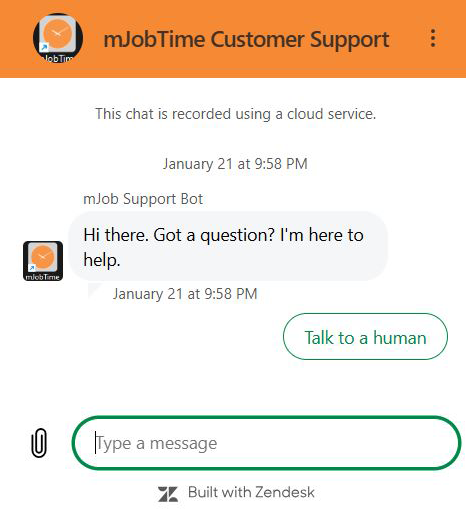
New Chat Feature

We've launched a new Zendesk Chatbot to provide instant support and answers to your mJobTime questions!

mJobTime Zendesk Bot

How it helps you:

  • 24/7 Availability: Get answers even after office hours.
  • Smart Search: Instant links to relevant help articles.
  • Easy Escalation: Seamlessly transition to a live agent.

Tips and Tricks

Web App Messages

Need to share an important update with your field team? The Web App Message feature lets supervisors create a message that logged-in WebApp users can quickly see and expand for more information.

Note: Only members of the Supervisor User Group can create and edit Web App Messages.

  1. 01

    Open the Web App Message setup area to create or edit the message your WebApp users will see.

    Web App Message setup screen
  2. 02

    Enter the information exactly as it should appear in the WebApp, add a web link when needed, and then click Save.

    Creating and saving a Web App Message
  3. 03

    Once saved, the message appears in the upper-left corner for logged-in WebApp users.

    Web App Message displayed to logged-in users
  4. 04

    Users can click the red message text to open and view the full message.

    Opening the full Web App Message
  5. 05

    If a web link was included when the message was created, users can click the blue underlined text to open that link.

    Linked text within a Web App Message
September Special • Ends 9/30/26

Buy One, Get One FREE!

Expand your mJob capabilities this September. Buy one add-on license or module and get the second one FREE. Take advantage of the offer before it ends on September 30, 2026.

Claim the Offer Offer expires 9/30/26

Latest from the Blog

View all →

We want to hear from you!

Have a question, feedback, or a topic you want us to cover next month? Let us know below.